 FFloww
Full Creator Reports
Revenue, subscribers, breakdowns by creator: every report reproduced and fully editable.
Make TikToks or promote the dash? Earn Pro & rewards →
Learn moreEvery Infloww module reproduced — not two static screenshots, a real app where every number is yours.
Where others stop at two static screens, FFloww reproduces the full interface — and lets you edit everything.
Revenue, subscribers, breakdowns by creator: every report reproduced and fully editable.
Top spenders, segments, spending history: the complete fan view.
Chatter performance, shifts, goals: manage the whole team like on the real platform.
The full ranking, unavailable elsewhere — with a downloadable leaderboard card ready to share.
Links, clicks, conversions: campaign management reproduced screen by screen.
The sensitive words module, faithful to the original, freely configurable.
Pipeline, follow-ups, and stats — free demo on the site, cloud save with Pro.
Logo, photos, and names: dress the interface in your agency colors.
Generate progressive curves and coherent breakdowns in one click, then fine-tune cell by cell.
Everything saved locally on every change. Close, reopen: nothing is lost.
Workspaces synced across your machines — online activation required.
Dashboard, Creator Reports, Fan Reports, Employee Reports, Leaderboard: the stats screens — every KPI is yours.
FFloww — Dashboard
100% editable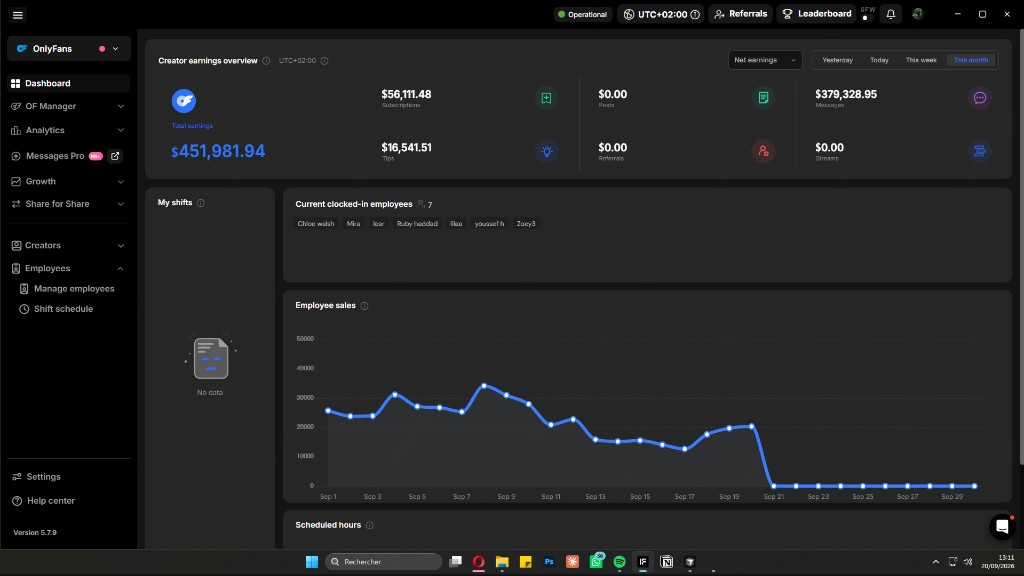
Six simple steps from account creation to your first presentation.
Sign up on the site — one account for web and app.
Get the Windows installer from the official site.
Guided installation, done in under a minute.
Use Log in (not Sign up) with the same email and password.
Type any value: everything redraws live.
Full screen, always up to date, identical to the original.
A local app, transparent about what it does — and especially what it doesn't.
Your workspaces and scenarios are saved on your device, not our servers.
The software does not request, store, or process any banking information.
No connection to Infloww or any other service is required: the software is standalone.
The software does not process payments: transaction screens only show values you enter.
The software does not publish, send, or share anything on your behalf.
The installer will be digitally signed once this feature is available.
1:1 clone, watermark included, updated within 48 h. Install now, present tonight.
3-day trial · No commitment · Cancel anytime